Android App Development
Every day, billions of people around the world unlock their phones and tap into apps that help them communicate, work, shop, learn, and play. A large majority of those devices run on Android, Google’s open-source mobile operating system that has become the backbone of the global smartphone industry. For developers, entrepreneurs, and businesses alike, building an Android app is one of the most direct ways to reach a massive, diverse, and ever-growing audience.
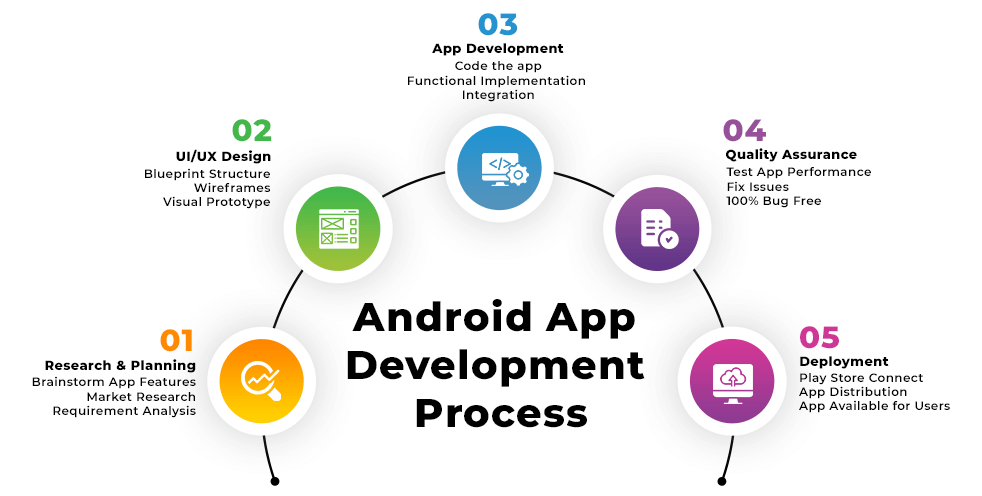
But Android app development is not just about writing code. It is a full journey that spans idea validation, interface design, programming, testing, deployment, and long-term maintenance. This guide walks through that entire journey in detail, explaining the platform’s history, the languages and tools developers rely on, the architectural principles behind well-built apps, and the strategies used to launch and sustain a successful application in today’s competitive market.
How Android Became the World's Leading Mobile Platform
Android’s story began in 2003, when a small startup called Android Inc. set out to build a smarter operating system for digital cameras before pivoting toward mobile phones. Google acquired the company in 2005, recognizing the potential of a flexible, Linux-based operating system that could be adapted across many types of hardware. The first Android-powered device, the HTC Dream, launched in 2008, marking the beginning of what would become the most widely used mobile operating system on the planet.
What set Android apart from the start was its open-source nature. Because manufacturers were free to license and modify the operating system, companies like Samsung, Motorola, Xiaomi, and countless others built their own Android-powered devices at every price point. This openness fueled rapid adoption, especially in price-sensitive markets, and gave Android an enormous global footprint that continues to expand today across phones, tablets, wearables, smart TVs, and even cars.
Why Developers and Businesses Choose Android
An Enormous and Diverse User Base
Because Android devices are manufactured by dozens of companies and sold at nearly every price point, the platform reaches users across every continent and economic background. For businesses looking to scale globally, this reach is difficult to match.
Freedom and Flexibility for Developers
Android’s open architecture gives developers deep access to system-level features, hardware components, and customization options that some competing platforms restrict. This makes it possible to build highly specialized apps, from advanced camera tools to custom hardware integrations.
A More Accessible Path to Publishing
Compared to some other app marketplaces, the Google Play Store has a lower one-time registration cost and a generally faster path from submission to publication, making it an attractive entry point for independent developers and small teams.
One Platform, Many Device Types
A single Android codebase, with some adaptation, can power apps running on smartphones, tablets, foldable devices, Android TV, Wear OS smartwatches, and Android Auto in vehicles — extending an app’s reach far beyond the traditional phone screen.
Choosing a Programming Language
Kotlin: The Modern Standard
Since Google named it the preferred language for Android development, Kotlin has become the default choice for most new projects. It offers concise syntax, built-in null safety to reduce crashes, and coroutines that simplify writing asynchronous code. Because Kotlin is fully interoperable with Java, teams can adopt it gradually without rewriting entire codebases.
Java: The Long-Standing Foundation
Java was Android’s original language and remains deeply embedded in the platform’s history. Many existing apps, libraries, and enterprise systems are still built in Java, and understanding it remains valuable for developers working with legacy code or older documentation.
C and C++ for Performance-Critical Work
Through the Android Native Development Kit (NDK), developers can write performance-sensitive components — such as game engines, audio processing, or complex simulations — in C or C++, then integrate that native code into an otherwise Kotlin or Java-based app.
Dart and Flutter for Cross-Platform Projects
Google’s Flutter framework, built on the Dart language, allows developers to write one codebase that compiles to both Android and iOS apps. Its widget-based design and fast hot-reload capability have made it a popular choice for startups wanting to launch on multiple platforms quickly.
The Developer's Toolbox
Android Studio
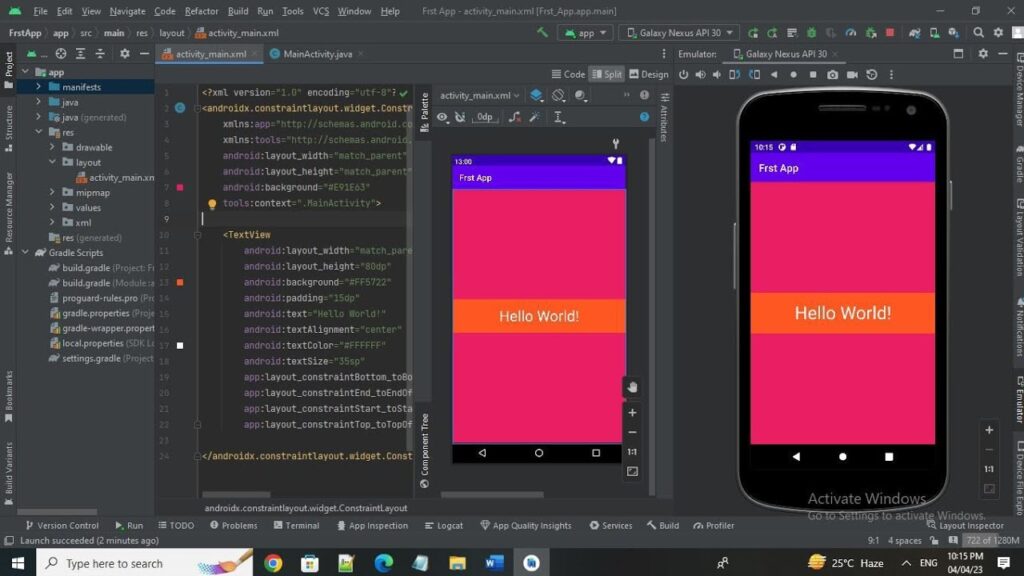
Android Studio is Google’s official IDE, built on the IntelliJ platform, and it remains the central hub for most Android development work. It bundles a smart code editor, a drag-and-drop layout designer, device emulators, and performance profiling tools into a single environment.
The Android SDK
The Software Development Kit provides the libraries and APIs required to interact with device hardware and Android system services, giving apps access to features like GPS, cameras, notifications, sensors, and background processing.
Gradle for Build Automation
Gradle manages the process of compiling source code, resolving external library dependencies, and packaging finished apps into installable files. Nearly every Android project, from simple hobby apps to massive enterprise systems, relies on Gradle build scripts behind the scenes.
Emulators and Real Devices
Testing on Android Virtual Devices lets developers simulate different screen sizes, hardware specs, and OS versions without owning dozens of physical phones. Still, testing on real hardware remains essential for catching performance quirks and device-specific bugs that emulators can miss.
Git and Collaborative Version Control
Source control systems like Git, often paired with platforms such as GitHub or GitLab, allow developers to track changes, collaborate across teams, and roll back mistakes safely — a practice considered non-negotiable in professional development environments.
Structuring an Android App the Right Way
Activities and Fragments
At a basic level, an Android app’s interface is built from Activities, which represent full screens, and Fragments, which represent reusable pieces of a screen that can be combined or swapped in and out. Managing their lifecycle correctly is one of the first challenges new Android developers must master.
Architectural Patterns
- MVC (Model-View-Controller): An early pattern separating data, display, and input handling, though it can become unwieldy in larger apps.
- MVP (Model-View-Presenter): Improves testability by moving presentation logic out of the UI layer and into a dedicated presenter class.
- MVVM (Model-View-ViewModel): The pattern most recommended today, especially alongside Android Jetpack, where a ViewModel holds UI data that survives screen rotations and other configuration changes.
Android Jetpack Libraries
Jetpack is Google’s collection of libraries designed to reduce boilerplate and encourage best practices. Notable components include:
- Room, which simplifies local database storage by wrapping SQLite in an easier-to-use API.
- ViewModel and LiveData, which help manage UI-related data in a lifecycle-aware, reactive way.
- Navigation Component, which simplifies moving between screens and passing data along the way.
- WorkManager, which handles background tasks that need to run reliably, even after app restarts or device reboots.
- Jetpack Compose, Google’s modern toolkit for building UI directly in Kotlin code rather than XML.
The Shift Toward Jetpack Compose
Jetpack Compose represents one of the biggest changes to Android development in years. Instead of designing screens through XML layout files, developers describe UI elements declaratively in Kotlin, similar in spirit to React or SwiftUI. This approach reduces repetitive code, speeds up UI iteration, and integrates naturally with the rest of the modern Android architecture stack.
Getting an App Published on the Google Play Store
Publishing involves several distinct steps that developers need to plan for carefully:
- Registering a Developer Account with Google, which requires a modest one-time fee.
- Preparing Store Assets, including an app icon, screenshots, a clear description, and often a short promotional video.
- Setting Distribution and Pricing Options, deciding whether the app will be free, paid, or offer in-app purchases, and choosing which countries it will be available in.
- Meeting Google’s Policies, including content guidelines, data privacy rules, and technical requirements like minimum target API levels.
- Submitting for Review, after which Google evaluates the app before approving it for public release.
- Tracking Performance Post-Launch, using the Play Console’s analytics to monitor installs, crash reports, and user reviews to guide future updates.
Turning an App Into Revenue
Advertising-Based Revenue
Many free apps generate income by displaying ads through networks like Google AdMob, a model especially common among games and utility apps with high daily engagement.
In-App Purchases
Apps can sell virtual goods, unlock premium features, or offer additional content directly within the app, a strategy particularly effective in gaming and lifestyle apps.
Subscription Plans
Recurring subscriptions have become increasingly popular for apps that deliver ongoing value, such as streaming platforms, productivity tools, or fitness and wellness apps, offering developers predictable long-term revenue.
Freemium Models
Offering a free version with optional paid upgrades allows developers to attract a wide user base while still monetizing engaged users who want additional features or an ad-free experience.
One-Time Paid Downloads
Charging a flat fee upfront still works well for specialized or professional tools where users clearly understand the value they’re paying for before downloading.
Common Obstacles Along the Way
Device Fragmentation
With so many manufacturers producing Android devices, developers must account for differences in screen size, processing power, and OS version, which can complicate both testing and optimization efforts.
Managing Performance and Battery Life
Inefficient code or poorly managed background processes can drain battery life and slow down devices, so developers need to be deliberate about how their apps use system resources.
Protecting User Data
With privacy regulations tightening around the world, developers must implement strong encryption, secure network communication, and transparent data collection practices to protect users and stay compliant.
Adapting to Frequent Platform Changes
Google regularly updates Android with new APIs, security requirements, and design standards, meaning developers must continually revisit and update their apps to remain compatible and competitive.
Where Android Development Is Headed
The Rise of Cross-Platform Frameworks
Tools like Flutter, React Native, and Kotlin Multiplatform continue to gain traction because they let teams maintain a single codebase for both Android and iOS, cutting development time while still delivering near-native performance.
AI and Machine Learning Built Into Apps
More apps now incorporate on-device machine learning for features like image recognition, predictive text, and personalized recommendations, often powered by tools such as Google’s ML Kit or TensorFlow Lite.
Designing for Foldables and Larger Screens
As foldable phones and large-screen devices become more mainstream, developers are placing greater emphasis on adaptive, flexible layouts that respond gracefully to changing screen dimensions and orientations.
Faster Networks, Richer Experiences
The continued expansion of 5G connectivity is enabling more ambitious app experiences, including smoother video streaming, real-time multiplayer gaming, and more responsive cloud-connected features.
A Greater Focus on Privacy
As data privacy regulations expand globally, Android developers are increasingly designing apps around minimal data collection, transparent permissions, and clear user consent, reflecting a broader industry shift toward privacy-conscious development.
Advice for Developers Just Getting Started
- Master the basics first. A solid understanding of Kotlin or Java will make every later concept easier to grasp.
- Build real projects, not just tutorials. Hands-on practice reveals problems and lessons that reading alone never will.
- Rely on official documentation. Google’s Android developer docs are consistently updated and remain one of the most trustworthy resources available.
- Get involved in developer communities. Forums, open-source contributions, and local meetups offer mentorship and practical feedback that accelerate growth.
- Stay current with the platform. Android evolves quickly, so keeping an eye on new Jetpack releases, Compose updates, and best practices pays off over time.
- Never lose sight of the user. Clean code and clever architecture only matter if the final product is genuinely easy and enjoyable to use.
Final Thoughts
Building an Android app is a journey that blends technical craftsmanship with creative problem-solving. It requires choosing the right tools and languages, understanding architectural best practices, designing thoughtful and accessible interfaces, and navigating the practical realities of testing, publishing, and monetizing a finished product. As Android continues to evolve — through Jetpack Compose, cross-platform frameworks, AI integration, and an increasing focus on user privacy — developers who stay curious and keep building will be well-equipped to create apps that genuinely serve the millions of people who rely on Android every single day.